 GenX Pro
Fal.ai Now Has a Desktop App - Connect 1,000+ Models to GenX Pro
Connect your fal.ai account once and use fal.ai’s image, video, voice and audio models in the GenX Pro desktop App for Mac and Windows, next to GenX’s own models.
Available in: GenX Pro v1.7.5 and above. Updated .
Connect fal.ai in GenX Pro Console → Settings.
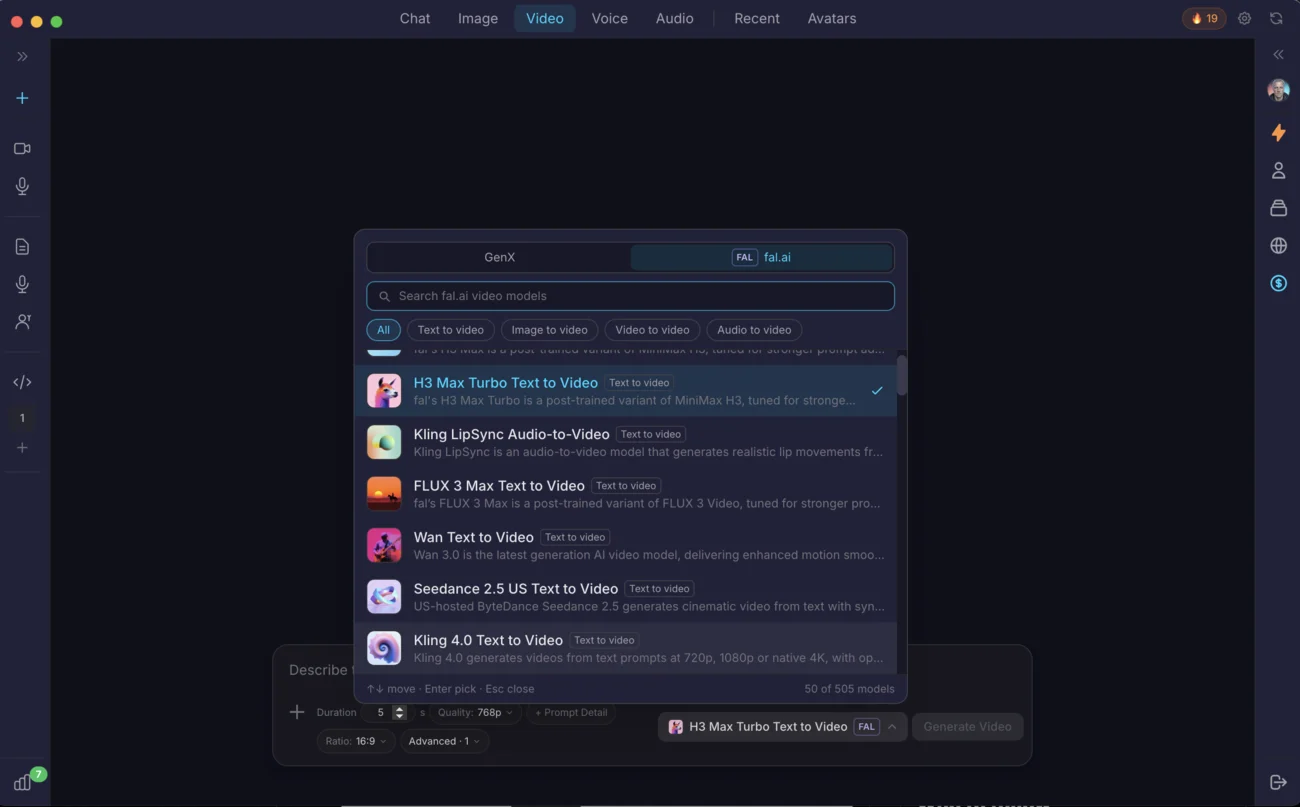
Connect your fal.ai API key in GenX Pro Console once. Then, in the App’s Image, Video, Voice and Audio tabs, switch the model picker to fal.ai, search or filter by category, pick a model and generate. Its settings use the same controls as GenX models, and you attach images, video and audio the usual way.
fal.ai Inside GenX Pro
What You Get
1,000+ fal.ai Models Inside One Desktop App
With a single click, you can connect 1,000+ AI models in your fal.ai account to GenX Pro, making them instantly available for all types of generation: images, videos, voice, and audio. Instead of opening a browser, searching for a model, and running multiple copy-and-paste actions, you can now run everything from a single app on your computer.
Our focus was on the experience. We wanted to ensure there is no difference in how you use GenX Pro’s natively integrated models vs. models from your fal.ai account. It all starts with finding a model, so we built an intuitive model picker so you can find the right one in a second.
Next came the parameters and the ability to create complex prompts. When you select a model from your fal.ai account, the supported settings will load automatically, and you will be able to attach assets and @mention them in prompts to get the desired outcome faster.
Plus, whenever fal.ai releases a new model, it will be instantly available in your GenX Pro so you can always get the latest, most capable model for the task.
Beast Agent Works with fal.ai Models

While manual generation, if you know the prompts, might be faster, nothing is more powerful than the Beast Agent with the 27 most intelligent models, such as GPT-6.2 Astra, Claude Fable 5.2, or Gemini 4 Carbon.
When you have an idea, just ask the Beast Agent in the chat to look up fal.ai models for you and build any workflow you want. It will quickly research the catalog and find a selection of the most suitable models for the task.
Regardless of the complexity of the task - whether it requires combining dozens of images, prompts, and editing sequences - the Beast Agent will deliver the outcome with precision.
Your Assets from Fal Always with Context
When you look inside your library in Console today, you can always see the full context of your generations long after they are completed. And now you get the same intelligence for all your fal.ai jobs.
This saves you time and money because sometimes you don’t even need to generate anything new. You just need to find the right asset from your previous work. With the GenX Pro Cloud Library, you get exactly that, and fal.ai generations are now included.
Even better, you don’t need to search them yourself - just ask Beast Agent to find it for you. Give it a clue of what you’re looking for, and it will find it in seconds.
Make It Even More Meaningful with Collections
When it comes to speed, collections are probably one of those “hidden” capabilities that don’t sound exciting but are super useful for serious work. And now you can use them with fal.ai models as well.
Whenever you start a new generation, think about it this way: is this a one-off, or is it a component of multiple generations? If it’s the latter, always attach a collection. It will organize all the assets from all generations in a collection that you can easily locate in your cloud library and also let the agent find it for you when needed.
The best part is that Collections will allow you to easily analyze your past work and save lots of generation rounds when working on a similar project.
How It Works
- Sign in to GenX Pro Console.
- Open Settings and connect your fal.ai account with its API key. You only do this once.
- Open or refresh the GenX Pro desktop App (v1.7.5 or above). All 1,000+ fal.ai models are in the model picker.
When fal.ai adds a model, it shows up in the App, and soon in the GenX Pro mobile app too.
FAQ
Which fal.ai models can I use in GenX Pro?
fal.ai’s image, video, voice and audio models, more than 1,000 of them. Search by name or filter by fal.ai’s own categories, such as text to video or image to video.
Can Beast Agent use fal.ai models?
Yes. It picks a fal.ai model for the task, checks what the model needs, writes the prompt and runs it, and can combine it with other models and steps in one workflow.
Where do my fal.ai results go?
Into your GenX Pro Cloud Library, with the prompt and model saved with each file. If a Collection is active, they also go into it.
Who pays for fal.ai generations?
Your fal.ai account, the same as when you use fal.ai directly.
Which App version do I need?
GenX Pro v1.7.5 or above, on Mac or Windows. Open or refresh the App after you connect fal.ai in Console.
Do new fal.ai models show up automatically?
Yes. New fal.ai models appear in the App without an App update.
Does it work in a team workspace?
fal.ai connects to your personal workspace, so switch to it in the App to use your fal.ai models.
Connect fal.ai in Console, then pick a fal.ai model in GenX Pro.