 GenX Pro
Give it a goal. Let it get to work.
Beast Agent is the AI agent in GenX Pro’s Chat. It researches, creates, reads and writes files, and uses tools on your computer, step by step, with any of the App’s chat models.
Works with: all 41 chat models in GenX Pro, in Auto, Reasoning and Max mode. Updated .
Start free, then see pricing for plans.
Tell Beast Agent what you want done. It plans the steps and uses its tools to do them: web research, image, video and voice generation, your Cloud Library, files on your computer, apps like ffmpeg and Python, a browser, and any tools you connect. One request can run up to 40 steps. It works the same with Claude Opus 5.5, GPT-6.2 Astra, Gemini 4 Hydrogen, Grok 4.7 and every other chat model in the App.
Any chat model, three modes
Pick a mode under the chat box. Auto chooses the model for you, Reasoning lets you pick from the general-purpose models, and Max runs models with extended thinking for hard, multi-step work. The tools are the same in every mode, and you can switch models in any chat.
See every option on the chat models page.
Create images, video, voice and music
Describe what you want. Beast Agent proposes the model, prompt and settings, then waits for your OK before it spends credits. Say “just generate it” to skip the check.
It generates images from text, edits an image you attach, and combines several reference images into one. It makes video from text or from an image, and with Gemini Omni Flash it can edit a clip it already made, for example to make the sky darker. For audio, it writes voiceovers, clones voices into saved voice profiles, and makes music and sound effects. It can also add styled captions to a video and build talking avatar videos.
Ask it to compare models and it explains which one fits the job. Every result is saved to your Cloud Library. For ready-made pipelines, see Pod Shorts, Daily Shorts and Voiceovers.
Read and create documents
Attach up to four PDFs or text documents (up to 10 MB each) and up to four images to a message, then ask about them.
Ask for a report, table or diagram and Beast Agent writes it as an HTML, Markdown, CSV, JSON or SVG file. Models that run code can also make PDFs, Excel files and charts. Your attachments and the files it creates are saved to your Cloud Library.
Research the web
Beast Agent searches the web and cites its sources. You can limit a search to recent results or to the sites you name. It also takes screenshots of public web pages and saves them to your Cloud Library, and it finds podcasts and lists their recent episodes.
Many models have their own web search as well, and Grok models can search X.
Find anything in your Cloud Library
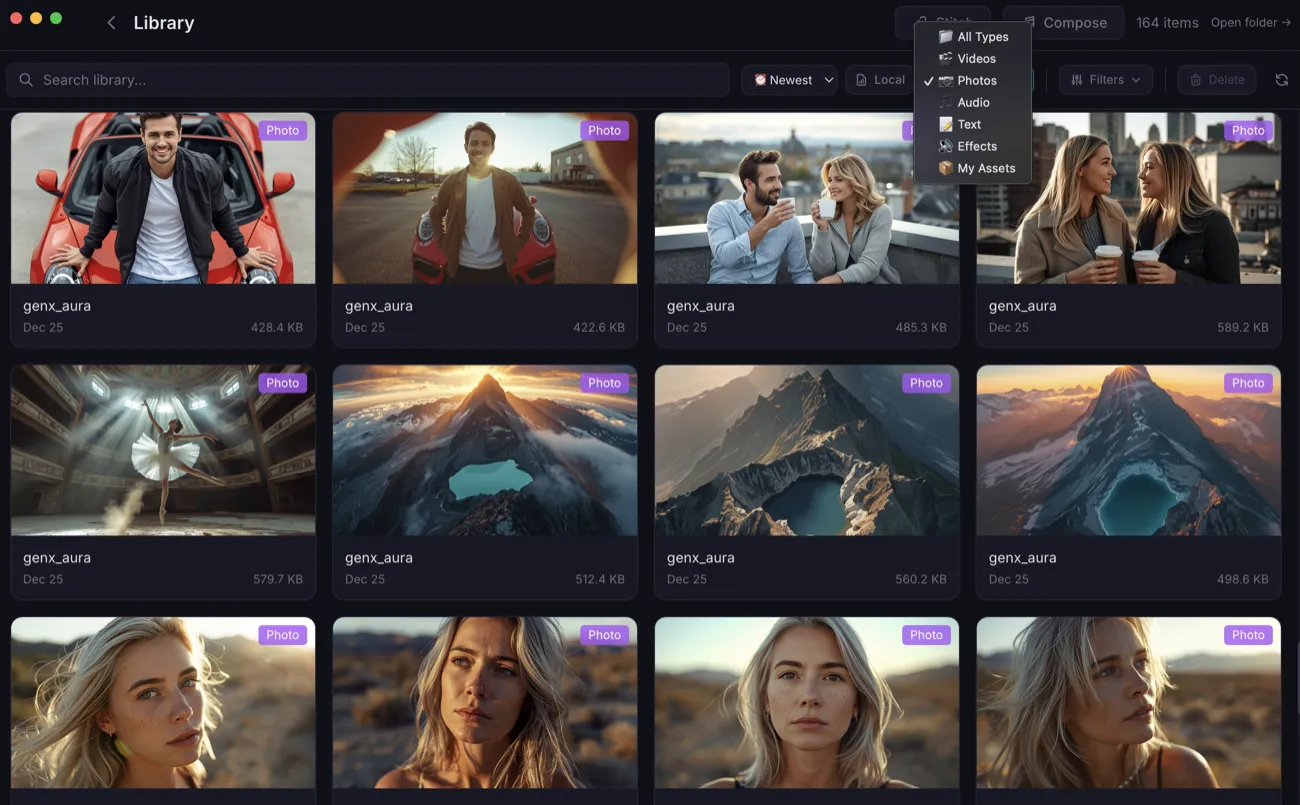
Ask for “my latest video”, “the file I just uploaded” or “the morning-routine video from last week”. Beast Agent looks up exact items, searches by description and counts what you have.
It also lists and creates Collections and adds items to them. Taking an item out of a collection never deletes the file. In a team workspace, it searches the team library.
Because it can find your earlier results, it can reuse one in a new edit instead of starting over.
Work on your computer
In the desktop App, Beast Agent works on your machine with your approval. It reads, lists, searches and edits files in folders you approve, once or always, and you can revert an edit with one click.
It runs tools like ffmpeg and yt-dlp, runs Python in a separate environment for each chat, and installs tools on macOS and Windows. Risky commands and every Python run ask first.
It can also open sites in the App’s browser, read pages, click and fill in forms. It asks before it visits a site for the first time.
Code projects in Code Station
Attach a project folder and Beast Agent reads, edits and reviews your code, following the project’s CLAUDE.md or AGENTS.md. Run up to three coding lanes side by side, each on a different coding model. See Code Station.
Add skills, tools and memory

Built-in skills load when a task needs them. Type /skills to browse them, /skill to pick one, or /addskill to install one from GitHub or skills.sh.
You can connect your own MCP servers, including ones that sign in with OAuth, and use “+” to point a request at one tool. Connect your fal.ai account and the agent can use fal.ai models as well (see fal.ai in GenX Pro).
Say “remember that…” and Beast Agent saves it. It recalls what matters in later chats, and “forget…” removes it.
One request, many steps
Beast Agent can run this request from start to finish:
“Research this month’s top three trends in home fitness, write a 30-second script about the best one, make a voiceover, generate a video for it, add captions, and put everything in a collection called Fitness Trends.”
- Searches the web and summarizes the trends with sources.
- Writes the script.
- Proposes a voice and makes the voiceover.
- Proposes a video model and generates the clip.
- Adds styled captions.
- Creates the collection and adds every result to it.
FAQ
Which models does Beast Agent work with?
All 41 chat models in GenX Pro, from Anthropic, OpenAI, Google, xAI and Meta. Every model gets the same tools. Creating PDFs, Excel files and charts needs a model that runs code.
Does Beast Agent touch my files without asking?
No. It only works in folders you approve, risky commands and Python runs ask first, and it asks before it visits a new website.
Does it generate without asking?
No. It proposes the model, prompt and settings and waits for your OK, unless you tell it to just generate.
Can I add my own tools?
Yes. Connect your own MCP servers, install skills with /addskill, or connect your fal.ai account.
Does Beast Agent remember me?
Yes. Ask it to remember something and it recalls it in later chats. Ask it to forget and it removes it.
How much does Beast Agent cost?
It runs on your GenX Pro credits or Usage Plan. See every plan on the pricing page.
Create your free account, download the App, and give Beast Agent its first goal.